The Offline Conversion Feedback Loop: A Practitioner's Blueprint
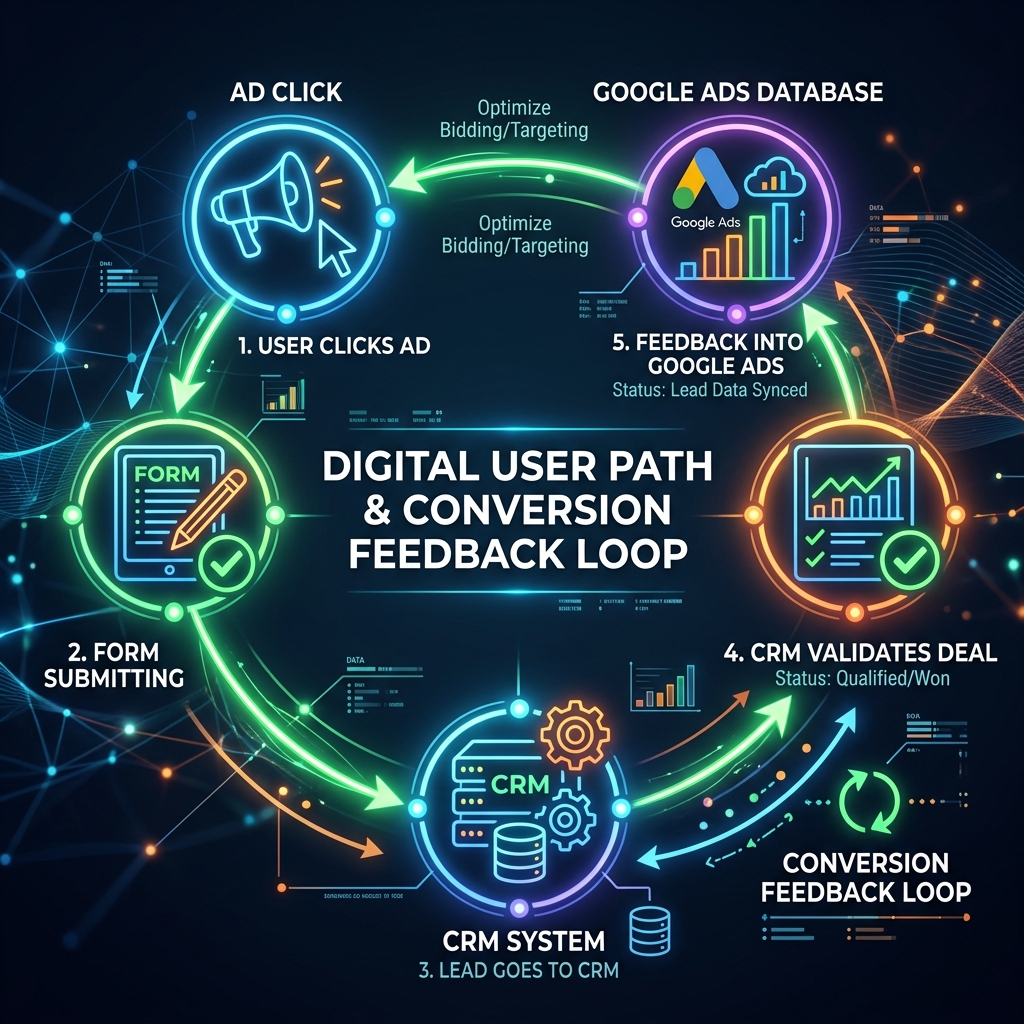
If I could only make one change to a paid search program—any program, any budget, any vertical—it would be implementing offline conversion tracking. Nothing else comes close in terms of impact per effort.
The reason is simple: without offline conversions, Google’s algorithm optimizes for the cheapest path to a form fill. With offline conversions, it optimizes for the pattern that leads to actual revenue. These are fundamentally different objectives that produce fundamentally different outcomes.
The Architecture
Here’s the complete system, from click to closed deal:
User clicks ad → GCLID captured → Form submitted → Lead enters CRM
     ↓                                                    ↓
Google Ads ←←←←←←←←←← Conversion event ←←←←←←←←← Lead qualifies/closes
The magic happens on that bottom arrow: the feedback loop from CRM back to Google Ads. Every time a lead moves through your pipeline, you tell Google exactly which click produced that outcome.
Step-by-Step Implementation
Step 1: Capture the GCLID
The Google Click Identifier (GCLID) is a unique parameter appended to your URL when someone clicks a Google ad. It looks like: ?gclid=Cj0KCQiA...
Your form needs to capture this parameter and store it alongside the lead’s contact information. Most form platforms (HubSpot, Salesforce Web-to-Lead, custom forms) can be configured to capture hidden fields from URL parameters.
Critical detail: The GCLID expires after 90 days. If your sales cycle is longer, consider using the newer Google Ads API with Enhanced Conversions, which can match on hashed email addresses instead.
Step 2: Define Your Conversion Events
Map your CRM pipeline stages to conversion events:
| CRM Stage | Conversion Action Name | Relative Value |
|---|---|---|
| Discovery Call Booked | call_booked | $50 |
| Qualified Opportunity | qualified_lead | $200 |
| Proposal Sent | proposal_sent | $500 |
| Contract Signed | closed_won | $2,000 |
The values don’t need to be exact revenue figures—they need to reflect the relative importance of each stage. A closed deal is worth 40x a booked call in this example, which tells the algorithm where to focus.
Step 3: Build the Upload Pipeline
You have three options for getting conversion data back to Google:
Option A: Manual Upload (Small volume) Export a CSV from your CRM with GCLID, conversion action, conversion time, and value. Upload via Google Ads UI. Works for teams processing fewer than 100 conversions per month.
Option B: Scheduled Import (Medium volume) Set up a Google Sheets integration or SFTP upload that runs daily. Your CRM pushes new conversion events to the sheet/file, and Google Ads ingests them automatically.
Option C: API Integration (High volume) Use the Google Ads API to push conversion events in real-time as leads progress through your pipeline. This is the gold standard, but requires development resources.
For most teams, Option B is the sweet spot: reliable, scalable, and doesn’t require custom engineering.
Step 4: Configure Conversion Settings
This is where practitioners commonly make mistakes:
- Conversion window: Match your sales cycle. If deals close in 60 days, set a 90-day window to capture late closers.
- Attribution model: Use data-driven attribution (DDA) if you have sufficient conversion volume (300+ conversions/month). Otherwise, use time-decay.
- Count: Set to “One” for lead gen (one conversion per click) vs. “Every” for e-commerce (multiple purchases per customer).
Step 5: Transition Your Bidding Strategy
Don’t flip the switch overnight. Here’s the migration path:
Week 1–2: Run offline conversions as “Observe only” (secondary conversion actions). This lets you validate data accuracy without affecting bidding.
Week 3–4: Once you’ve confirmed data matches between Google Ads and your CRM, promote offline conversions to primary conversion actions.
Week 5–8: Transition bidding to Target CPA or Target ROAS based on your offline conversion data. Expect a learning period of 2–3 weeks where performance may fluctuate.
Week 8+: The algorithm has retrained. You should see fewer total conversions but dramatically higher conversion quality. Cost per qualified lead should decrease even if cost per form fill increases.
The Results Pattern
Across every implementation I’ve managed, the results follow a predictable pattern:
- Month 1: Total lead volume decreases 10–20%. Marketing team panics.
- Month 2: Qualified lead volume holds steady or increases. Sales team notices better quality.
- Month 3: Cost per qualified lead drops 15–30%. The algorithm has identified the pattern.
- Month 6: The system compounds. You’re spending less to generate more revenue.
The hardest part isn’t the technical implementation. It’s the organizational patience required in Month 1.
The feedback loop is the foundation. Everything else is optimization on top of it.